Thursday, 13 March 2014

::: Brace Your self for "Wireshark Challenge" :::

Hello gEEKs,

Here i come with an interesting challenge on Wireshark ...

Go through the below link to take the challenge ...

http://www.wiresharktraining.com/sharkfest2013challenge.html

Hope you will eNJOy ...

Monday, 10 March 2014

::: BURP Suite - Pentester Tool ::: Tutorial on Dictionary Attack :::

Hello guys, Thanks for your support and suggestions , this makes me motivate to post interesting articles.

Today i'm posting a yet another interesting 'Pentesting Tool' - "BURP Suite" mostly used by Security Professionals while testing on web application. It comes handy and very easy to use functionality provided with all the integrated tools to perform Attacks. 

About Burp Suite ?
  • Burp Suite is an integrated platform for performing security testing of web applications. Its various tools work seamlessly together to support the entire testing process, from initial mapping and analysis of an application's attack surface, through to finding and exploiting security vulnerabilities.
  • Burp gives you full control, letting you combine advanced manual techniques with state-of-the-art automation, to make your work faster, more effective, and more fun.
Explanation about HTTP basic authentication.
HTTP supports several authentication mechanisms. Upon a request for resource within a protected space the server should respond with authentication challenge using WWW-Authenticate header. In order to receive authorization the client should send requested identification information using Authorization header. When the client is not authorised a 401 “Unauthorised” response status is returned.

The simplest and most common HTTP authentication in use is Basic. The clients need to provide the credentials in a Base64 encoded string username:password. If the credentials are correct the web server returns the requested resource otherwise the server repeats the authentication challenge.


Requirements:
1. Download BURP suite at portswigger.net (in this tutorial I use the free edition) and install it.
2. Download the PHP login script I've already made to test BURP suite locally.

Dictionary Attack on Login Page using BURP Suite :
1. The PHP script on requirement number 2 is a simple log in page. You can copy it to your HTDOCS folder if you use XAMPP or WAMP for your web development platform. The picture below is the preview when I try to access it on my local system.

2. Run your BURP suite and change your browser proxy setting to run through BURP application. By default BURP will use port 8080, if you don't know how to change the browser proxy settings, you can view the tutorial how to configure browser proxy.
Proxy--> Options in BURP

3. When proxy already set up, now we can access the login.php file. In this example, for testing purpose, I will input username = test and password = test. When we click the submit button(LOG IN), BURP will intercept the data as shown in the picture below. 


Right click and choose "Send to Intruder".


4. On INTRUDER –> POSITIONS tab, change the attack type to "Cluster Bomb".

5. After finished setting up the attack type, we can move to PAYLOADS tab. To fill this PAYLOADS, see the picture on step 4
Payload set 1 = PHPSESSID (the value)
we will set up the same PHP SESSID value, because the system use a static PHPSESSID.

6. Now we will change the payload set number two, we're still on PAYLOADS TAB.
Payload set 2 = username (the value)


7. On payload number three we will input the password.
Payload set 3 = password (the value)


on this step you also can load from a password list, but in above example I input the passwrd one by one.
8. The last PAYLOADS to set up is the submit parameter.
Payload set 4 = submit (the value)


since this submit is to check whether user click the button or not, we can make it the same value LOG+IN%21.

9. Every PAYLOADS has been set up successfully, now we will start the attack and watch BURP suite perform the attack automatically. Click Intruder and choose "Start Attack".


10. BURP suite itruder will check the username and password one by one. When there's matching username and password, you can view the length was changed. As this is a dummy login page so you don't find any changes in the length
  
How to prevent Dictionary Attacks ?
1. To prevent this kind of attack, as a user you can do nothing, as developer you can do like GMail anti brute force system where every trying is logged by the system based on their IP address. If you try to log in and failed for several times, the system will force the user to solve the captcha.
2. As a developer you can do add the salt into username and password to make attack time much longer since you've add the salt.

I hope you will enjoy :)

Please do subscribe my blog if you like it.
Thank you...

References :
http://portswigger.net/


Monday, 17 February 2014

7 "S!ns" t00ls I use in every W3b @pp Testing

Hola! amigos ...

Today i am going to post some of my work on penetration testing. And thanks for all the  feedback, which keeps me motivating  to improve my posts in my blog.

So the tools which i use in every web application tests are :


  1. Metasploit 
  2. BurpSuit
  3. Nessus
  4. Acunetix
  5. Nmap/Zenmap
  6. SQLmap
  7. sslScan


1. Metasploit Framework 
Metasploit was created by HD Moore in 2003 as a portable network tool using Perl. By 2007, the Metasploit Framework had been completely rewritten in Ruby. On October 21, 2009, the Metasploit Project announced that it had been acquired by Rapid7, a security company that provides unified vulnerability management solutions.


The basic steps for exploiting a system using the Framework include:
  • Choosing and configuring an exploit (code that enters a target system by taking advantage of one of its bugs; about 900 different exploits for Windows, Unix/Linux and Mac OS X systems are included);
  • Optionally checking whether the intended target system is susceptible to the chosen exploit;
  • Choosing and configuring a payload (code that will be executed on the target system upon successful entry; for instance, a remote shell or a VNC server);
  • Choosing the encoding technique so that the intrusion-prevention system (IPS) ignores the encoded payload;
  • Executing the exploit.
This modular approach – allowing the combination of any exploit with any payload – is the major advantage of the Framework. It facilitates the tasks of attackers, exploit writers and payload writers.

Metasploit runs on Unix (including Linux and Mac OS X) and on Windows. It includes two command-line interfaces, a web-based interface and a native GUI. The web interface is intended to be run from the attacker's computer. The Metasploit Framework can be extended to use add-ons in multiple languages.

To choose an exploit and payload, some information about the target system is needed, such as operating system version and installed network services. This information can be gleaned with port scanning and OS fingerprinting tools such as Nmap. Vulnerability scanners such as Nessus can detect target system vulnerabilities. Metasploit can import vulnerability scan data and compare the identified vulnerabilities to existing exploit modules for accurate exploitation.


2. Burp Suit
Burpsuit is the main tool I use, simply put it’s the best one to use. It has loads of features and if you have the pro version you can sometimes identify low hanging fruit. It allows you to scan the site, intercept requests and modify paramaters. You can use tampa data to modify requests but burpsuit has many more features that really does make life easier.

3. Nessus
Nessus is a remote security scanning tool, which scans a computer and raises an alert if it discovers any vulnerabilities that malicious hackers could use to gain access to any computer you have connected to a network.  It does this by running over 1200 checks on a given computer, testing to see if any of these attacks could be used to break into the computer or otherwise harm it.

4. Acunetix
Acunetix Web Vulnerability Scanner (WVS) is an automated web application security testing tool that audits your web applications by checking for exploitable hacking vulnerabilities. Automated scans may be supplemented and cross-checked with the variety of manual tools to allow for comprehensive web site and web application penetration testing.

5. Nmap/Zenmap
Nmap ("Network Mapper") is a free and open source (license) utility for network discovery and security auditing. Many systems and network administrators also find it useful for tasks such as network inventory, managing service upgrade schedules, and monitoring host or service uptime. Nmap uses raw IP packets in novel ways to determine what hosts are available on the network, what services (application name and version) those hosts are offering, what operating systems (and OS versions) they are running, what type of packet filters/firewalls are in use, and dozens of other characteristics. It was designed to rapidly scan large networks, but works fine against single hosts. Nmap runs on all major computer operating systems, and official binary packages are available for Linux, Windows, and Mac OS X. In addition to the classic command-line Nmap executable, the Nmap suite includes an advanced GUI and results viewer (Zenmap)

6. SQLmap
The next tool is sqlmap. I use this then when I need it, mainly if I identify an sql injection point. This allows me to easy dump the database without knowing every sql statement off by heart.

7. sslScan

Last but not least sslscan, this is great to determine the ciphers that are supported on a website. It identifes if it’s using sslv1 or sslv2 as well as if it is using encryption equal too or greater than 128bits.

These are the tools which i use most for commiting the 'S!nS'.

If you want to explore more penetration tools better you install BackTrack5 or Kali OS on your workstation and try out pentesting.

Note: But i suggest you not to depend on these tools, as some of the tools won't help you much. Based on scenarios  create your own tools in Python, ruby etc in which you are comfortable.

Check this some of the sites, which may help you better in understanding security concepts

www.securitytube.net
&
Off course My blog ...

**************************** Waiting for your feedback ********************************
  Thank you for your support ... Enjoy Pentesting

This post is for educational purpose only 

Monday, 20 January 2014

::: RAKABULLE - Advanced Remote Administration Tool from DarkComet :::

I hope you all still remember the famous and powerful remote-access Trojan (RAT) called 'Dark Comet', developed by a French computer geek 'Jean-Pierre Lesueur', also known as 'DarkCoderSc'.

However, He had closed the Dark Comet project, when the Syrian government found to be using it to track down and to spy on their people. After that DarkCoderSc started working under a new banner 'Phrozen Software' to develop many new security softwares and penetration testing tools.

On 16 January, 2014 , Jean-Pierre and his team-mate Fabio Pinto from French University, have released a new tool called 'Rakabulle', a file binder with some cool features for penetration testers and malware researchers.


What is a File Binder ?
File binder is an application that allows a user to bind multiple files together, resulting in a single executable file. When you execute that single application, all previous merged files will be extracted to a temporary location, and will be executed normally.

"The builder Rakabulle application will create a stub and inject in its resource the target files to extract and execute. The stub is the little generate part of the program which is designed to extract from its resource the target files to a temporary location and execute. In our application the stub also got a part to inject in Explorer or Internet Explorer process and load custom made plugins".

Below are the features of  "Rakabulle":

File binder, auto file extractor and executor.
REM (Remote Code Execution), Execute code (Plugins) in target process (Explorer or Internet Explorer)
Support 32 and 64 Process.
The application is a 32bit Application (Soon we will compile the 64bit version)
Support UPX compression for the stub (Without compression stub size is about 38KiB using pure Windows API no extra libraries; with compression stub size is approximately 16KiB) The UPX compression doesn’t change the way the application work only the final size.
Support Windows startup.
Doesn’t require administrative privileges.
Plugins and File list support drag and drop.
Support plugins with an open source example.
The stub and the builder are coded using Unicode encoding.

Video Demo
Download Rakabulle here


Wednesday, 18 December 2013

::: GLANCES : Linux Desktop Montioring Tool :::

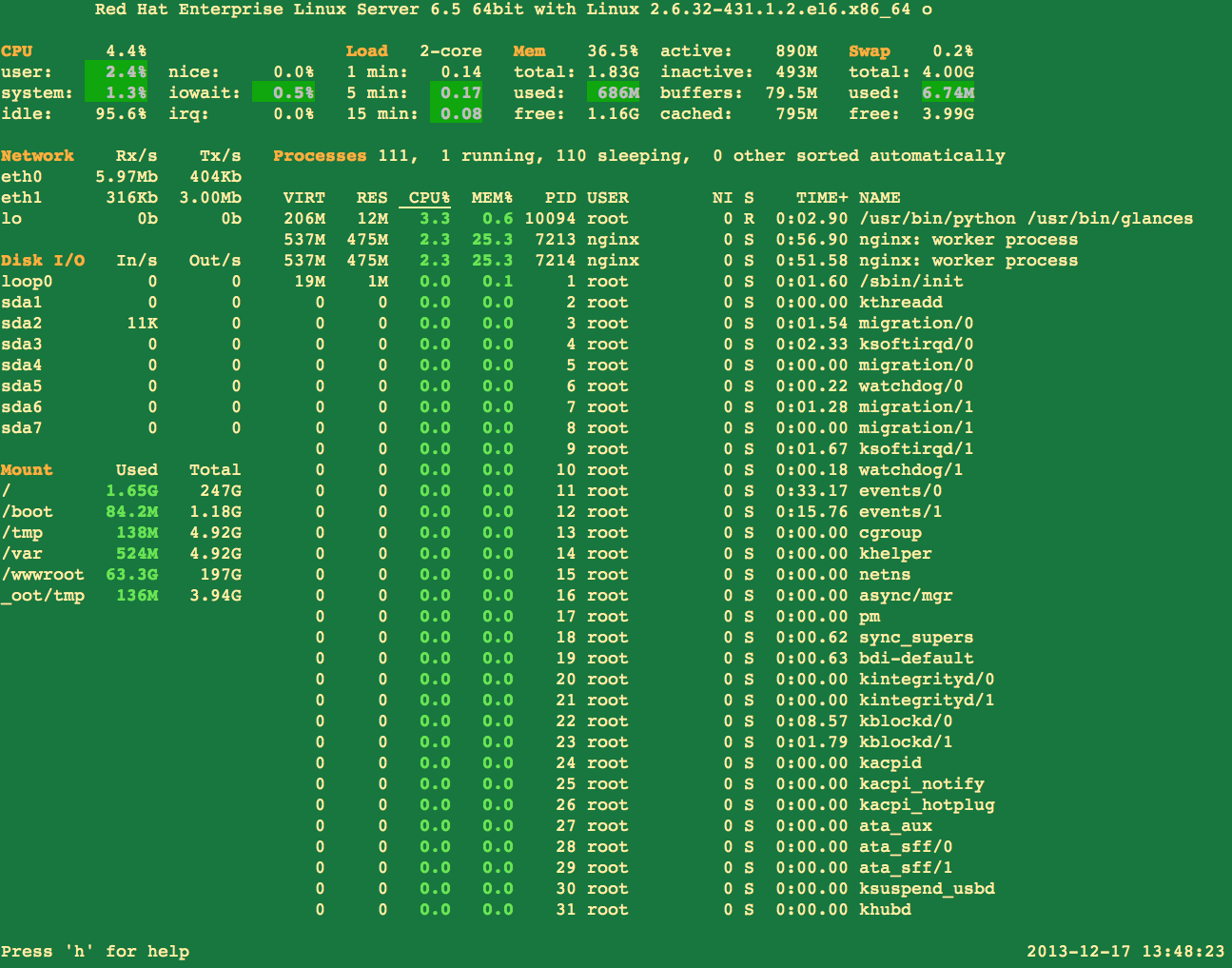
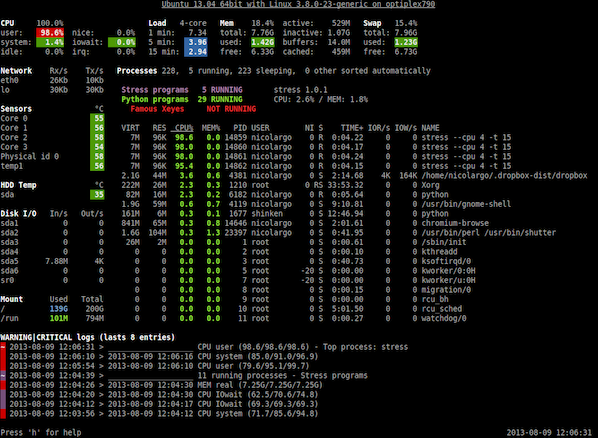
Glances is a free (LGPL) cross-platform curses-based monitoring tool which aims to present a maximum of information in a minimum of space, ideally to fit in a classical 80x24 terminal or higher to have additionnal information. Glances can adapt dynamically the displayed information depending on the terminal size. It can also work in a client/server mode for remote monitoring.


This tool provide info about your server

1.CPU load
2.OS Name/Kernel version
3.System load
4.Disk and Network I/O
5.Process
6.Memory usage
7.Mount point and much more.

Installation

You can install Glances using pip command line tool. You will also find packages for Arch Linux, Fedora/CentOS/RHEL, Debian, Ubuntu (13.04+), FreeBSD, OSX and so you should be able to install it using your favorite package manager as follows:

Install Glances on CentOS/Fedora/RHEL/Scientific Linux

First, turn on Extra Packages for Enterprise Linux (or EPEL) repo on CentOS/RHEL/SL. Type the following yum command:
# yum -y install glances
Sample outputs:
yum install glances
Loaded plugins: product-id, protectbase, rhnplugin
This system is receiving updates from RHN Classic or RHN Satellite.
rhel-x86_64-server-6                                 | 1.5 kB     00:00
rhel-x86_64-server-optional-6                        | 1.5 kB     00:00
0 packages excluded due to repository protections
Setting up Install Process
Resolving Dependencies
--> Running transaction check
---> Package glances.noarch 0:1.7.1-1.el6 will be installed
--> Processing Dependency: python-psutil >= 0.4.1 for package: glances-1.7.1-1.el6.noarch
--> Processing Dependency: python-setuptools for package: glances-1.7.1-1.el6.noarch
--> Running transaction check
---> Package python-psutil.x86_64 0:0.6.1-1.el6 will be installed
---> Package python-setuptools.noarch 0:0.6.10-3.el6 will be installed
--> Finished Dependency Resolution
 
Dependencies Resolved
 
============================================================================
 Package             Arch     Version          Repository              Size
============================================================================
Installing:
 glances             noarch   1.7.1-1.el6      epel                   107 k
Installing for dependencies:
 python-psutil       x86_64   0.6.1-1.el6      epel                    84 k
 python-setuptools   noarch   0.6.10-3.el6     rhel-x86_64-server-6   336 k
 
Transaction Summary
============================================================================
Install       3 Package(s)
 
Total download size: 527 k
Installed size: 843 k
Is this ok [y/N]: y
Downloading Packages:
(1/3): glances-1.7.1-1.el6.noarch.rpm                | 107 kB     00:00
(2/3): python-psutil-0.6.1-1.el6.x86_64.rpm          |  84 kB     00:00
(3/3): python-setuptools-0.6.10-3.el6.noarch.rpm     | 336 kB     00:00
----------------------------------------------------------------------------
Total                                       1.8 MB/s | 527 kB     00:00
Running rpm_check_debug
Running Transaction Test
Transaction Test Succeeded
Running Transaction
  Installing : python-psutil-0.6.1-1.el6.x86_64                         1/3
  Installing : python-setuptools-0.6.10-3.el6.noarch                    2/3
  Installing : glances-1.7.1-1.el6.noarch                               3/3
  Verifying  : python-setuptools-0.6.10-3.el6.noarch                    1/3
  Verifying  : python-psutil-0.6.1-1.el6.x86_64                         2/3
  Verifying  : glances-1.7.1-1.el6.noarch                               3/3
 
Installed:
  glances.noarch 0:1.7.1-1.el6
 
Dependency Installed:
  python-psutil.x86_64 0:0.6.1-1.el6
  python-setuptools.noarch 0:0.6.10-3.el6
 
Complete!
 

Install Glances on Debian/Ubuntu Linux (13.04+)

Type the following command:
$ sudo apt-get install glances

How do I use glances?

The basic syntax is:
# glances
# glances [options]

Sample outputs:
Fig.01: glances in action (click to enlarge)

To quit just press q (Esc and Ctrl-C also work). Here is another output from Ubuntu based system:
Fig.02: Glances in action (Image credit - Glances author)
HTML5 capable browser user can view quick video demo by clicking the following link:

Fine tuning output (interactive commands)

Use the following hot keys to find tune your output:
  • a Sort processes automatically.
  • c Sort processes by CPU%.
  • m Sort processes by MEM%.
  • p Sort processes by name.
  • i Sort processes by I/O rate.
  • d Show/hide disk I/O stats.
  • f Show/hide file system stats.
  • n Show/hide network stats.
  • s Show/hide sensors stats.
  • y Show/hide hddtemp stats.
  • l Show/hide logs.
  • b Bytes or bits for network I/O.
  • w Delete warning logs.
  • x Delete warning and critical logs.
  • 1 Global CPU or per-CPU stats.
  • t View network I/O as combination.
  • u - View cumulative network I/O.

How do I use Glances in client/server mode?

On server type the following command to bind server to the given IPv4/IPv6 address or hostname:
# glances -B @IP|host
# glances -B 75.126.153.206
# glances -B www.cyberciti.biz

From your desktop client such as OSX/FreeBSD/Linux based system type the following command to connect to a Glances server by IPv4/IPv6 address or hostname:
# glances -c @IP|host
# glances -c 75.126.153.206
# glances -c www.cyberciti.biz

You may need to pass the -P password to set a client/server password. The -s run Glances in server mode:

How do I refresh information every 5 seconds?

Type the following command:
# glances -t 5
More info check source : http://www.cyberciti.biz , https://github.com/nicolargo/glances


Wednesday, 11 December 2013

::: New w0rm (Linux.Darlloz) Creates Havoc for Linux PC's :::

What is Computer W0rm ?
A computer worm is a standalone malware computer program that replicates itself in order to spread to other computers.Often, it uses a computer network to spread itself, relying on security failures on the target computer to access it. Unlike a computer virus, it does not need to attach itself to an existing program. Worms almost always cause at least some harm to the network, even if only by consuming bandwidth, whereas viruses almost always corrupt or modify files on a targeted computer.

Linux.Darlloz - A new worm is targeting x86 computers running Linux and PHP, and variants may also pose a threat to devices such as home routers and set-top boxes based on other chip architectures.

According to security researchers from Symantec, the malware spreads by exploiting a vulnerability in php-cgi, a component that allows PHP to run in the Common Gateway Interface (CGI) configuration. The vulnerability is tracked as CVE-2012-1823 and was patched in PHP 5.4.3 and PHP 5.3.13 in May 2012.

The new worm, which was named Linux.Darlloz, is based on proof-of-concept code released in late October, the Symantec researchers said Wednesday in a blog post.

For more details : check the link

source : www.computerworld.com , www.symantec.com


Tuesday, 3 December 2013

::: Webpage Screenshot Plugin for Chrome Browser :::

Webpage Screenshot is a Google Chrome extension that allows you to take screenshots of the entire webpage with a click of a button. You can Save, Edit and Share with your friends instantly.

Webpage Screenshot is available in the Chrome Web Store as an installable plugin for FREE!

Download plugin